
Overview
Plastics split by heat tolerance. Acrylic and tougher plastics take a clean CO2 mark; heat-sensitive plastics take a cold UV mark that won’t warp or discolor them.
Why CO2 & UV Work on Plastics
CO2 at 10.6 µm frosts acrylic to a crisp white-on-clear mark and cuts it cleanly too. UV at 355 nm marks cold, so thin films, PPR/PVC/PE and sensitive engineering plastics stay flat and intact — the safe choice where a CO2 burn would damage the part.
Built to Last
The mark is a change in the surface itself, not ink on top, so it won’t smear, peel or wash off under normal handling.
Specs That Matter
CO2 10.6 µm for acrylic and tougher plastics; UV 355 nm (cold, ultra-fine) for sensitive plastics and films. Fields 100–300 mm, matched to the material.
How to Mark Plastic
- Fixture the part and set the focus to the surface.
- Choose CO2 (acrylic) or UV (sensitive plastic) and set parameters.
- Run a sample, check contrast and that the part stays flat, then save the recipe.
- Set repeat positioning and start the batch.
- Inspect and log first-article approval.
Applications
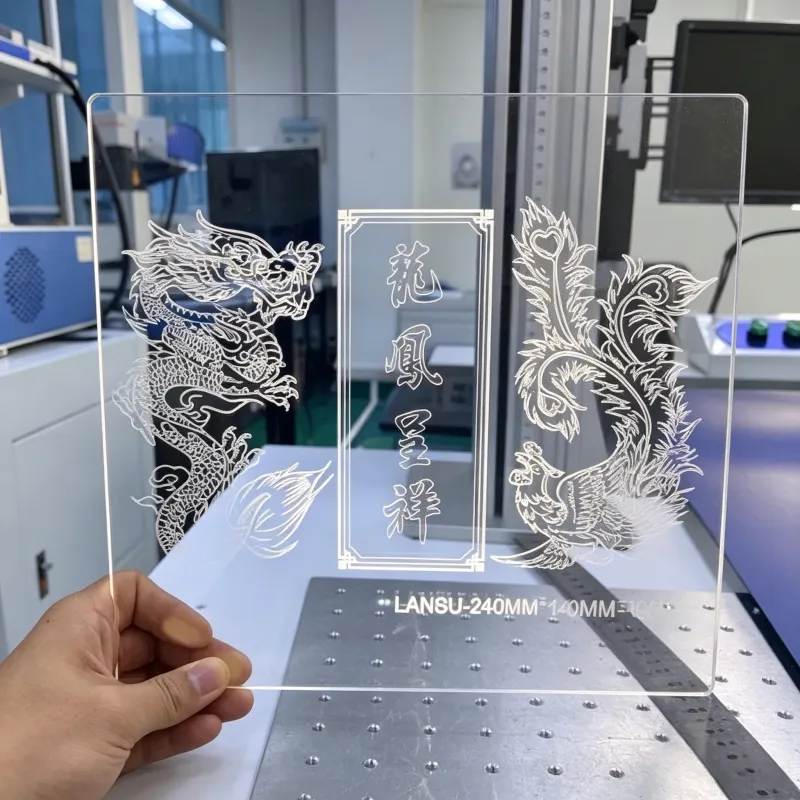
Acrylic displays and signage, plastic housings and panels, films and labels, bottle caps, engineering plastics.
CE Compliance
CE-marked, with conformity documentation available on request. We never claim SASO, SABER, GCC or UKCA we do not hold.
Getting It Right Before You Buy
Send us your plastic. We’ll mark it on the right source, show you the result, then quote against it.
Request a Quote · Download the Spec Sheet
Explore: Non-Metal Marking. Related: CO2 Marking · UV Marking.
1-year warranty; installation, training & after-sales support available.